
The Dashboard is the first page users see at login. It can be accessed at any time by clicking the Dashboard tab in the top navigation bar, or by clicking the Amp Health logo in the top right corner of the screen. This page surfaces data that is critical to the completion of the providers daily work as well as some high level insights into the risks and resiliency of the workforce.
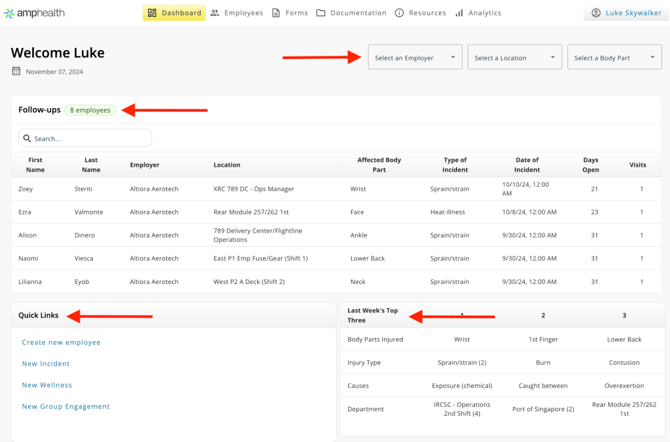
To begin, the Dashboard displays data for all Employees in your care. Use the Filters to filter the data on the page by Employer, Location, or Body Part.
To start, we see our Follow-ups—Employees that we have previously engaged with that require our attention. Use the Search bar to navigate to an individual employee, click their row to open the Incident document.
Quick Links allows you to take immediate action from this page by linking directly to commonly use features.
Last Week’s Top Three surfaces injury trends across the workforce. Injuries are displayed by Body Part, Injury Type, Cause, and Department.
Engagements is a utilization widget highlighting the number of engagements This Week, Last Week, and Year-to-Date.
Work in Progress is related to our documentation functionality. As data is being added to Forms, work is autosaved and displayed here. If you are unable to finish, or get called away, you can complete the form here at any time by clicking on the form's row. Work in Progress forms are considered incomplete and thus do not appear on any other tables.
The Functional Movement Assessment widget surfaces data related to functional movement assessment data collected using the Amp Health mobile app. This is an aggregate view of results across the workforce.
Workforce Aggregate Injury Risk highlights possible risk areas by body part at a glance.